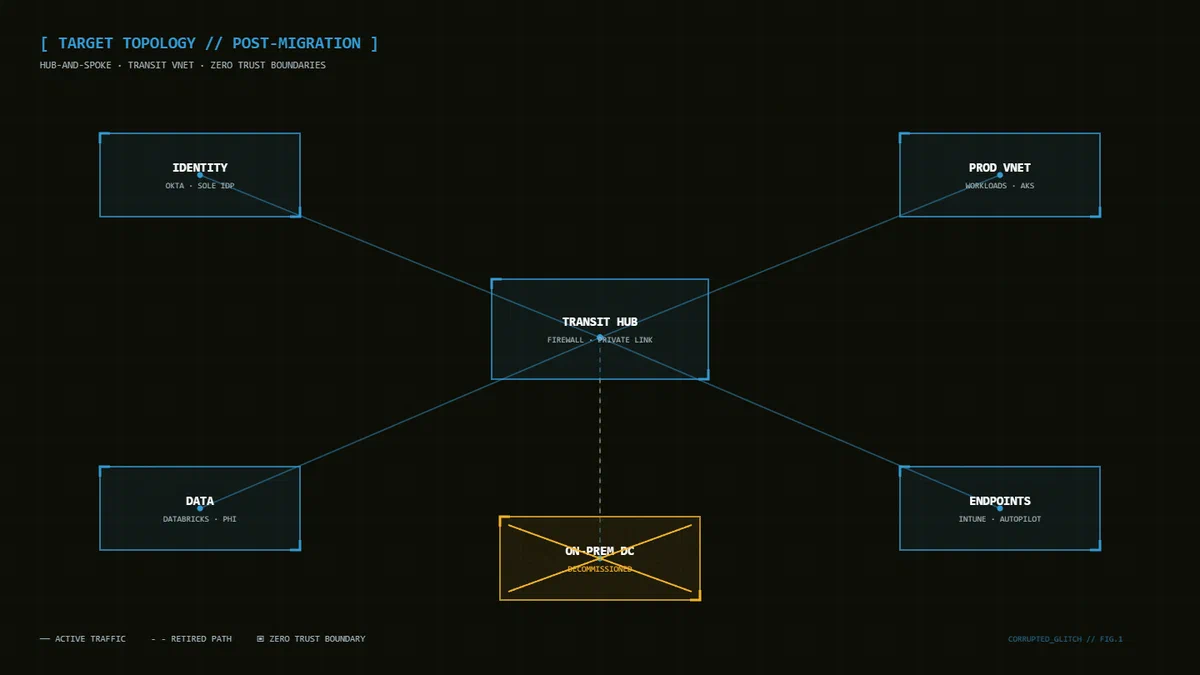
Full build log: migrating 100% of core on-prem infrastructure to cloud-native and collapsing 27 legacy apps onto a single IDP — with zero business interruption.
The mission: exit a physical datacenter completely, retire on-prem Active Directory, and land every workload and identity in a cloud-native model. Outcome: 20% opex reduction, 27 apps consolidated under SSO, zero business interruption.
[ MISSION PARAMS ]
SCOPE 100% of core on-prem infrastructure IDENTITY on-prem AD → Okta (sole IDP) + Entra ID APPS 27 legacy apps → centralized SSO DOWNTIME 0 business interruptions RESULT −20% annualized opex # Target Architecture▸ IMG_LOG // Fig 1 — hub-and-spoke target state. The on-prem DC ends the project as a struck-through box.# Phase 1 — Inventory Everything That AuthenticatesNothing moves until you know what talks to AD. Export every app, service account, and LDAP bind:
discovery/ad-inventory.ps1
POWERSHELL
[ COPY ] 1
2
3
4
5
6
7
8
9
# Every service principal + last logon — the honest app inventory
Get-ADUser -Filter {servicePrincipalName -like "*" } -Properties servicePrincipalName, lastLogonTimestamp |
Select-Object Name, @{n="SPNs" ;e={$_.servicePrincipalName -join ";" }},
@{n="LastLogon" ;e={[DateTime ]::FromFileTime($_.lastLogonTimestamp)}} |
Export-Csv ad-service-inventory.csv -NoTypeInformation
# LDAP binds hitting the DCs (enable 2889 auditing first)
Get-WinEvent -LogName "Directory Service" -FilterXPath "*[System[EventID=2889]]" -MaxEvents 5000 |
Select-Object TimeCreated, Message | Export-Csv ldap-binders.csv -NoTypeInformation
◈
[ TIP // OPERATOR_ADVICE ]
Sort the inventory by LastLogon descending and kill everything stale first. A third of our “27 apps” turned out to be ghost integrations nobody owned — decommissioned, not migrated.
# Phase 2 — Stand Up the Identity Plane FirstIdentity moves before workloads. Okta becomes the sole IDP, federated with Entra ID for the Microsoft estate:
Deploy Okta org → configure Entra ID federation (Okta as IDP, Microsoft 365 as SP). Onboard apps in waves of 5, SAML/OIDC first, SWA last. Enforce Conditional Access + MFA at the Okta policy layer, not per-app. okta/app-wave-check.sh
BASH
[ COPY ] 1
2
3
4
5
6
7
8
9
#!/usr/bin/env bash
# Gate: no wave ships until every app in it passes an auth smoke test
for app in $( cat wave-3.txt) ; do
status= $( curl -s -o /dev/null -w "%{http_code}" \
"https://corp.okta.com/api/v1/apps?q= ${ app} " \
-H "Authorization: SSWS ${ OKTA_TOKEN} " )
[ " $status" = "200" ] || { echo "FAIL: ${ app} " ; exit 1; }
done
echo "WAVE CLEAR"
# Phase 3 — Workload Waves Behind a Health GateEvery workload follows the same state machine:
DRAIN → SYNC_FINAL → FLIP → OBSERVE(15m) → COMMIT | ROLLBACK
The OBSERVE gate compares error rate, p99, saturation, and a business KPI against the same weekday one week prior. Breach → automatic rollback, no meeting required.
# Phase 4 — Decommission and Prove the SavingsPower down is not done. Done is: contracts terminated, circuits cancelled, hardware disposed with certificates, and the −20% opex visible in the GL. Track it like a burn-down:
Milestone Target Actual Workloads migrated 100% 100% Apps on SSO 27 27 Business interruptions 0 0 Opex reduction 15% 20%
✎ [ FIELD_NOTE // LESSON LEARNED ]
The datacenter exit was easy. The contract exit was war. Start the colo/circuit termination clock in Phase 1 — some carriers need 12 months’ notice.